


Cybersecurity matters more than ever. Yet many organizations miss one major weak spot: security misconfiguration. These errors are preventable, but they can open the door to serious attacks.
The Open Web Application Security Project (OWASP) updated its well-known top 10 list of vulnerabilities in 2021. Security misconfiguration ranked as the 5th most dangerous risk.
Want to know what a security misconfiguration is and how it affects your business? You’re in the right place. Let’s look at the dangers and the steps you can take to protect your organization.
What is a Security Misconfiguration?
A security misconfiguration happens when security settings are set up wrong or left at their defaults. These mistakes leave systems open to cyberattacks. It can be as simple as not removing default passwords. Or it can mean leaving unneeded features turned on in servers.
These simple mistakes often leave big gaps in your security. Attackers can then exploit the security misconfiguration vulnerability with ease.
Common Types of Security Misconfigurations
1. Default Configurations
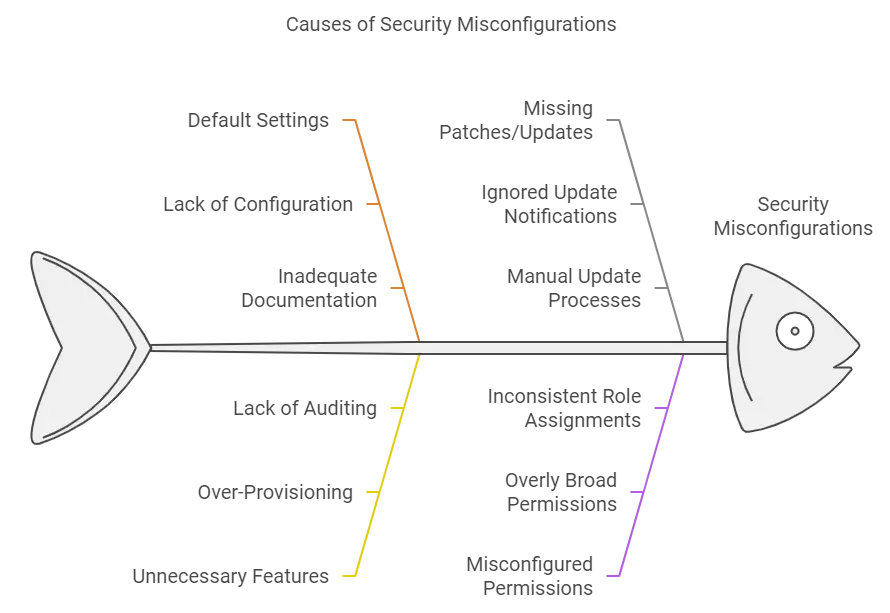
One of the most common misconfigurations is leaving default settings untouched. Default passwords, ports, or configurations are widely known, giving attackers a straightforward entry point. Always update and customize these settings.
2. Unnecessary Features and Services
Many applications or systems come with a range of services, features, or functionalities enabled by default. If these features are not used, they may become a security risk.
For example, an app might have debug or demo features turned on. Or unused APIs might be open to the internet. Attackers can exploit both. Turning off features you don’t need shrinks your attack surface and closes off entry points.
3. Improper Access Controls
Without proper access controls, sensitive data could be exposed. It’s essential to assign permissions carefully and limit access to only those who truly need it.
4. Unpatched Systems
Each day a security patch goes unapplied, your risk goes up. Unpatched software is one of the top causes of security misconfiguration attacks. Keep your systems up to date with the latest patches and security updates.
5. Incomplete or Missing Security Settings
Security tools can only protect you if they’re configured properly. Incorrect firewall or encryption settings can leave gaps in your defense, even if you’re using the right tools.
6. Misconfigured Permissions
Users or apps might have more access than they need. Attackers can use those extra privileges to break into systems.
7. Directory Listing Enabled
This setting reveals the structure of web directories, potentially exposing sensitive files that shouldn’t be visible.
8. Improper Error Handling
Detailed error messages might disclose information like database structures, server types, or configuration details.
9. Open Ports
Leaving unused network ports open invites attackers to explore and exploit potential vulnerabilities associated with those ports.
Real-World Security Misconfiguration Examples
Several major data breaches have been caused by security misconfigurations. One of the best-known is the 2017 Equifax breach. Unpatched software let hackers reach the personal data of over 147 million Americans. The damage was huge. Fines and lawsuits cost the company over $700 million.
Another example is the 2019 Capital One breach. A misconfigured firewall in a cloud environment exposed sensitive customer data. These cases show how costly it is to leave security misconfigurations unfixed.
More articles you might like:
- The Five Most Common Security Breaches
- Understanding the Difference Between MDM vs MAM: A Comprehensive Guide
- What Do You Need to Implement a BYOD Policy?
Consequences of Security Misconfigurations
The consequences of security misconfigurations can be catastrophic:
- Data Breaches: Sensitive data like financial records, personal details, or intellectual property can be exposed. According to CloudSecureTech, a data breach can cost a business millions on average. Sadly, 60% of small businesses close within six months after a cyber-attack.
- Financial Losses: Data breaches are expensive. The average cost of an organization detecting and escalating a data breach is $1.58 million.
- Reputational Damage: Customers lose trust in companies that cannot protect their data, leading to lost business opportunities.
- Legal and Regulatory Penalties: Companies can face steep fines if found in violation of regulations like GDPR or CCPA.
How to Prevent Security Misconfigurations
Now that you understand the risks let’s look at how you can prevent a security misconfiguration in your systems.
1. Conduct Regular Security Audits
Review and audit your security settings often to make sure they are set up correctly. Don’t assume your systems are secure. Check. This is the kind of ongoing oversight IT support for Central Florida businesses is built to provide.
2. Apply Patches and Updates Promptly
Make patch management a priority. Set up automatic updates if possible, or ensure your IT team follows a strict patching schedule.
3. Disable Unnecessary Services
Reduce your attack surface by disabling services and features you don’t use. This minimizes the chances of these entry points being exploited.
4. Follow Security Best Practices
Utilize security frameworks such as the OWASP (Open Web Application Security Project) to guide your configuration processes.
5. Train Employees Regularly
Ensure that your IT staff and employees know the importance of proper configurations. Training should be a continuous process, especially as new tools and technologies are implemented. A Glance at Security Misconfiguration Prevention
Misconfiguration Issue
Proactive Solution
Default Admin Credentials
Use strong, unique passwords
Unrestricted Access Permissions
Implement least privilege access controls
Lack of Secure Data Transmission
Enforce SSL/TLS for all data exchanges
Misconfigured Cloud Settings
Regularly audit cloud configurations
Missing Logging and Monitoring
Set up automated monitoring and alerts
Overly Permissive Firewall Rules
Regularly review and restrict firewall access
Prosource - Your Partner in Preventing Security Misconfigurations
Security misconfigurations are a leading cause of cyberattacks, but you can prevent them. Run regular audits, apply patches, and follow best practices. These steps lower your exposure to security misconfiguration attacks.
ProSource helps businesses secure their systems and avoid these risks through cybersecurity services in Orlando. Ready to protect your organization from misconfigurations? Contact us today for a consultation.
Related articles

Why Cyber Awareness Training Is Critical for Your Business
Cyber threats are constantly evolving and targeting businesses of all sizes. However, despite sophisticated security measures, the most significant vulnerability often comes from within—your employees. According to resea
Read more →
Break Fix vs Managed Services: Choosing the Right IT Support
Deciding between managed services and break-fix services can be challenging for many businesses. Managed services provide proactive IT support, with studies from CloudSecureTech showing potential cost reductions of 25-45
Read more →
Your Blueprint to Overcoming IT Managed Services Challenges
Navigating managed IT challenges is a complex task and a top priority for many organizations today. Hurdles like cost management and security concerns, for instance, can create significant roadblocks on the path to IT su
Read more →Book the Free Assessment
Call (888) 948-7767 or schedule online. We'll review your environment and give you a written report with every gap we find.
No obligation. No sales pitch. Just an honest picture of where your business stands. ProSource has been doing this since 2006, from our offices in Oviedo, Orlando and Melbourne.