

The five most common security breaches are malware installed through deception, unauthorized OS or admin access, physical device access, insider threats, and compromised passwords. Each one is preventable with the right safeguards.
Here’s how each breach happens — and the specific steps you can take to stop it before it affects your business. Staying aware of common cybersecurity threats is one of the best ways to keep your business protected.

1. You are tricked into installing malicious software
One of the most common ways a system’s security is breached is through downloaded malware. In almost every case where malware is installed, the user was tricked into downloading it.
A common trick used by hackers is planting malware in software hosted on warez and torrent websites. When users visit the site, they are informed that they need to download the software in order for the site to load properly. Once downloaded, the malware infects the system. In other cases, hackers send emails with a malware-infected attachment.
There is a nearly limitless number of ways you can be tricked into downloading and installing malware. Luckily, there are steps you can take to avoid this:
- Never download files from an untrusted location. If you are looking at a website that is asking you to download something, make sure it’s from a company you know and trust. If you are unsure, it’s best to avoid downloading and installing the software.
- Always look at the name of the file before downloading. A lot of malware is often disguised with names that are similar to legitimate files, with only a slight spelling mistake or some weird wording. If you are unsure about the file, then don’t download it. Instead, contact us so we can verify its authenticity.
- Stay away from torrents, sites with adult content, and video streaming sites. These sites often contain malware, so avoid them altogether.
- Always scan a file before installing it. Use your antivirus scanner to check downloaded apps before opening them. Most scanners are equipped to do this by right-clicking the file and selecting Scan.
2. Hackers are able to modify the operating system (OS) settings
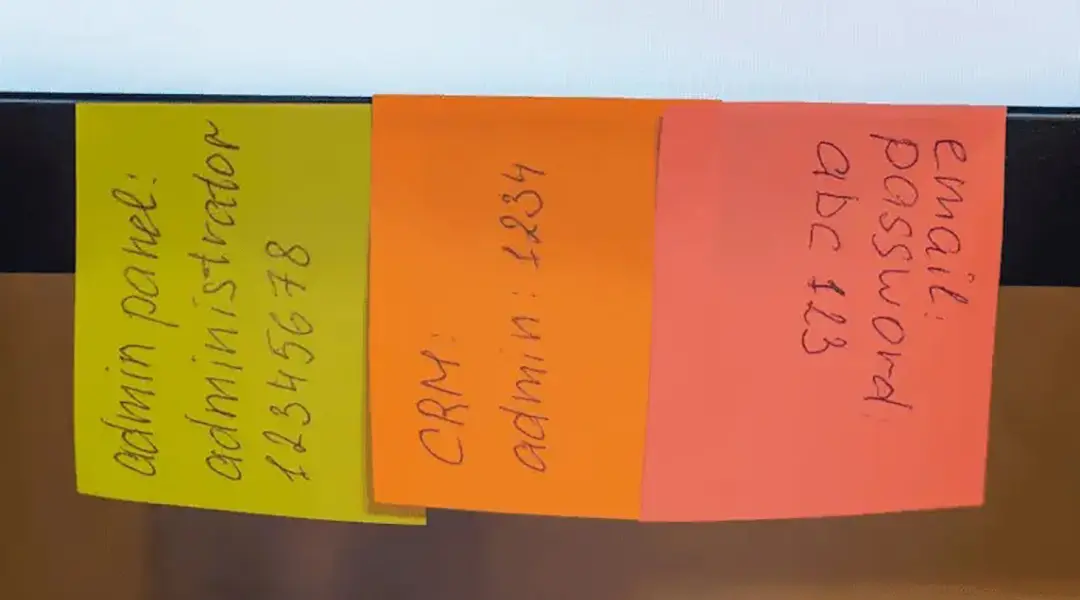
Many users are logged into their computers as admins. Being an administrator allows you to change all settings, install programs, and manage other accounts.
If a hacker manages to access your computer with you as the admin, they will have full access to your computer. This means they could install other malicious software, change settings, or even completely hijack the machine. The biggest worry about this, however, is if a hacker gets access to a computer used to manage the overall network. Should this happen, they could gain control of the entire network and do as they please.
To avoid this, limit the administrator role only to users who need to install applications or change settings on the computer. Beyond this, installing security software like antivirus scanners and keeping them up to date, as well as conducting regular scans, will help reduce the chances of being infected, or seeing infections spread.
3. Someone physically accesses your computer
These days, it seems like almost every security threat is trying to infect your IT infrastructure from the outside. However, there are many times when malware is introduced into systems, or data is stolen, because someone has physically accessed your systems.
Let’s say you leave your computer unlocked when you go for lunch and someone walks up to it, plugs in a malware-infected USB drive, and physically infects your system. They could also access your system and manually reset the password, thereby locking you out and giving them access.
Secure yourself by setting up a password to control access to your computer. You should also lock, turn off, or log off from your computer whenever you step away from it.
Beyond that, disable drives like CD/DVD and connections like USB if you don’t use them. This will limit the chances of anyone using these removable media to infect your computer.
4. Someone from within the company infects the system
We’ve seen a number of infections and security breaches that were carried out by a disgruntled employee. They could delete essential data, or remove it from the system completely. Some have even gone so far as to introduce highly destructive malware. The most effective way to prevent this, aside from ensuring your employees are happy, is to limit access to systems.
Your employees don’t need access to everything, so reexamine what your employees have access to and make the necessary adjustments. For example, you may find that people in marketing have access to finance files or even admin panels. Revoke unnecessary access rights and ensure that employees only have access to the files they need.
5. Your password is compromised
Your password is the main way you can verify and access your accounts and systems. The issue is, many people have weak passwords. And with the steady increase in the number of stolen user account data, it could only be a matter of time before they can crack your password and compromise your account.
To add insult to injury, many people use the same password for multiple accounts, which could lead to a massive breach. Therefore, you should use strong and different passwords for your accounts.
To further enhance your password security, utilize multi-factor authentication (MFA), which uses more than one method of verifying a user’s identity, such as a fingerprint or a one-time code.
If you’re unsure whether your current security protocols are strong enough, a professional security consulting engagement can identify gaps before attackers do.
Get a free security assessment today to see exactly how your systems measure up.
For ongoing protection beyond the assessment, see threat monitoring and response from ProSource.
Frequently Asked Questions
What is the most common cause of a security breach?
Malware delivered through deceptive downloads or phishing emails is one of the most common causes, since it typically requires tricking a user into installing it.
How can small businesses prevent security breaches?
Limit administrator access, require multi-factor authentication, use strong unique passwords, keep antivirus software updated, and train employees to spot phishing attempts.
Should I get a cybersecurity assessment for my business?
Yes. A free security assessment identifies specific vulnerabilities in your current setup before they can be exploited.
Related articles

CMMC Phase 2 Suspension: What Florida Contractors Should Do
CMMC Phase 2 was suspended July 13, 2026, but DFARS and NIST 800-171 still apply. What Florida defense contractors should do during the pause.
Read more →
What Is Zero Trust Security and Does Your Business Need It?
Learn what Zero Trust security means, how it protects your business, and whether your small or midsize business needs a Zero Trust strategy.
Read more →
The Silent Killer of Business Growth: Tech Debt
Whether you run a healthcare practice, engineering firm, construction company, or small business, outdated technology is quietly costing you more than you think. Most businesses do not fail because of one big technology
Read more →Book the Free Assessment
Call (888) 948-7767 or schedule online. We'll review your environment and give you a written report with every gap we find.
No obligation. No sales pitch. Just an honest picture of where your business stands. ProSource has been doing this since 2006, from our offices in Oviedo, Orlando and Melbourne.